
How Rapid Radios Nationwide LTE Push-to-Talk Works
Rapid Radios work like a classic walkie-talkie without the range limits. Every radio connects over 4G LTE, so your team can push to talk across town or across the country. Behind each radio is RapidOPS®, our management system for tracking and organizing your fleet, plus a free mobile app that turns your phone into a radio on your account. Explore the Rapid Radios G1 and the rugged, waterproof Rapid Radios RAD1.
RapidOPS® Customer Management Portal
Manage Your Whole Fleet from One Dashboard

24/7 Access from Any Device

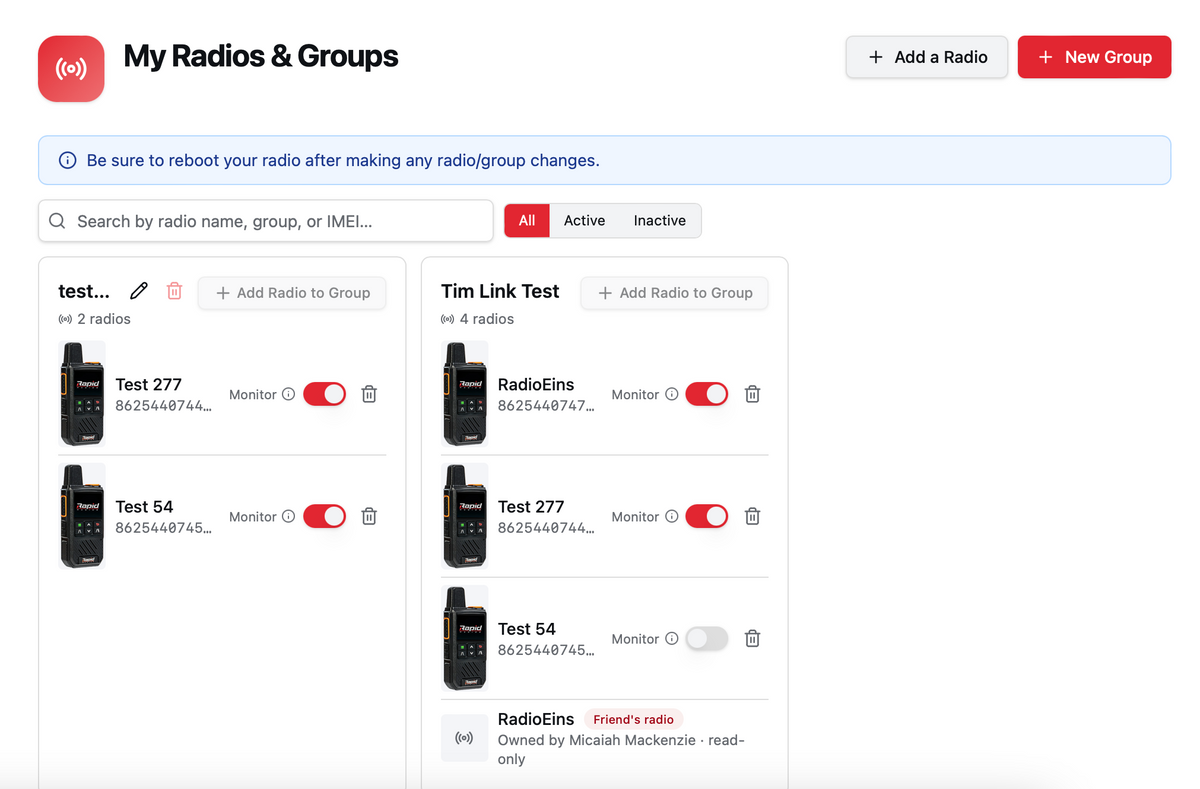
Manage Radios & Groups

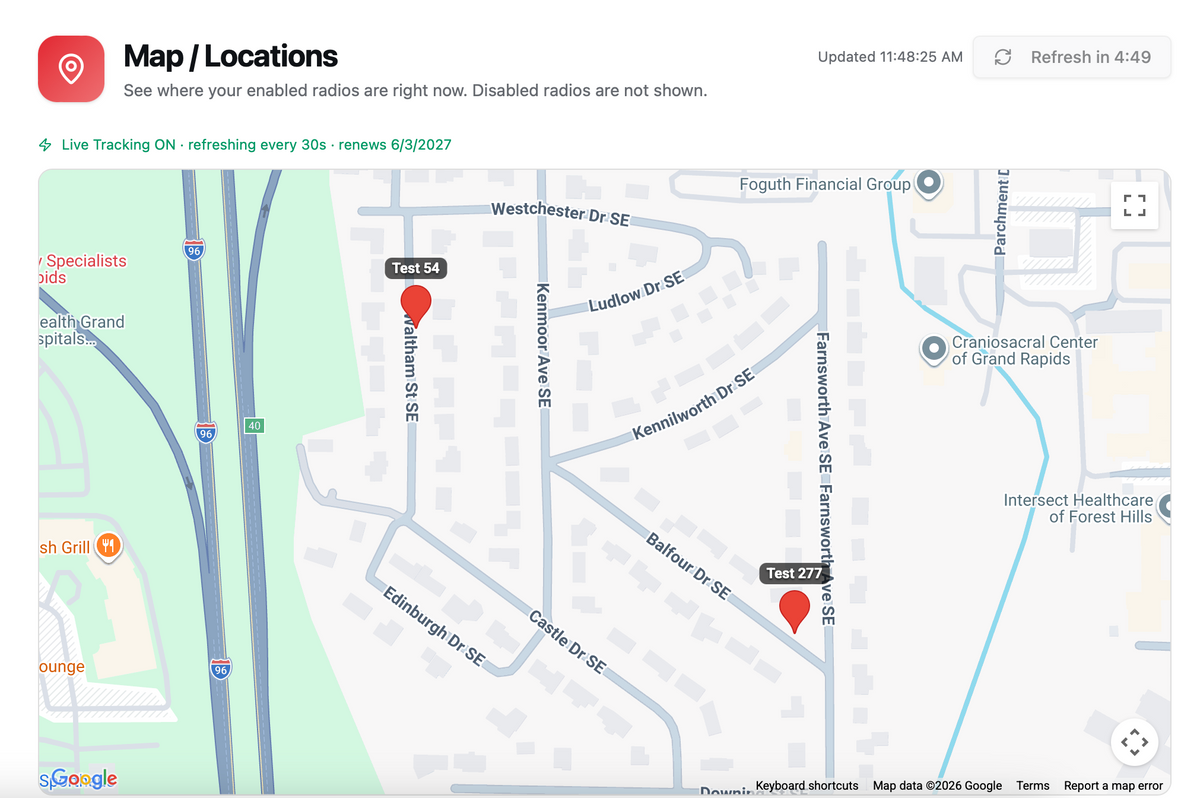
Live Location Tracking for Your Fleet

Adjust Radio Settings Remotely
Rapid Radios Mobile App

Log in 24/7 and use your phone as a radio on your account

Talk over Wi-Fi or LTE
wherever you are
Available on Android and iOS


Turn Your Phone into a Push-to-Talk Radio
Rapid Radios turns your Android or Apple phone into one of the radios on your Rapid Radios account. Sign in with your RapidOPS account, pick a radio, and you are on the air with your group, wherever your phone has Wi-Fi or mobile data.

One sign-in, all your radios
- Sign in with the Rapid OPS account you already have. Your radios and groups are there, no setup.
- Log in as any active radio on your account, and switch between them in a tap.
- Rename radios, create groups, and choose which radios are in each group, right from the app.

Talk like a radio
- Hold to talk, let go to listen. One button, just like the handheld.
- Hear your group with the screen off, in your pocket, or while you use other apps.
- See who is talking, who is online, and which group you are in.
- Listen in on other groups while you stay on your own.

Bluetooth earbuds and headsets
- Listen and talk through Bluetooth earbuds, AirPods and headsets (or wired earbuds)
- Press the headset button to talk.
- Audio follows your headset automatically; pick Speaker or Earpiece whenever you want.

Voice to text
- Words appear on screen while someone is still talking; the full message follows when they let go.
- Recognition runs on your phone, in English, even without internet.

Accessibility mode
- Made for noisy places, quiet meetings, and anyone who is hard of hearing.
- Silent mode: mute the radio and keep reading.
- A notification for every transmission: who is talking, and what they said.

Always on
- Keeps your radio connected in the background, with the screen off, for as long as you are logged in.

Manage radios and groups
- Rename radios and create new groups from your phone.
- Add or remove radios from any group in a few taps.

Switch radios in a tap
- Be any active radio on your account. Pick it and log in with one tap.
- See each radio's plan, expiry date and groups at a glance.
Who the app is for
The app is free for Rapid Radios customers and uses the radios and service already on your account. While your phone is logged in as a radio, that handheld is off the air; log out in the app to hand it back. New to Rapid Radios? Start with the G1 nationwide walkie-talkie or the rugged RAD1, or browse all two-way radios.
Rapid Radios Technology FAQ
Nationwide. Because they run on LTE, you can talk from one state to another wherever there is cellular coverage or Wi-Fi (with the RAD1) across the U.S. Global access is available as an add-on.
RapidOPS® is the online control center for your radios. Log in 24/7 from a computer or mobile device to rename radios, build and change talk groups, see live locations for your fleet, and adjust radio settings remotely.
Yes. The Rapid Radios app for Android and iOS is free for Rapid Radios customers and uses the radios and service already on your account. While your phone is logged in as a radio, that handheld is off the air until you log out in the app.
Yes. The app works on Wi-Fi or mobile data (LTE), and it stays connected in the background, even with the screen off, for as long as you're logged in.
Log in using the same credentials as your RapidOps account.
The Rapid Radios G1 is our nationwide LTE push-to-talk walkie-talkie. The Rapid Radios RAD1 adds a waterproof, rugged build with both LTE and Wi-Fi. Compare them in all two-way radios, and outfit your crew with Rapid Radios accessories like headsets, chargers and cases.
Yes. The Rapid Radios mobile app works with Bluetooth earbuds, AirPods and Bluetooth headsets, as well as wired earbuds, so you can listen and talk hands-free. Press the button on your headset to talk, just like pressing push-to-talk on a handheld. Audio switches to your headset automatically when it connects, and you can change to Speaker or Earpiece at any time. For your handheld radio, the Stealth Radio Headset works with all of our radios.
Yes. The Rapid Radios mobile app includes features for people who are deaf or hard of hearing. Voice to text shows each message on screen as it is spoken, then displays the full message when the speaker lets go. Speech recognition runs on your phone in English, even without an internet connection. Accessibility mode adds a notification for every transmission showing who is talking and what they said, and silent mode lets you mute audio and keep reading. These features also help in noisy job sites and quiet meetings.
